Every degree needs
a dependency graph,
not a PDF syllabus.
ARCADE centralizes verified notes, structured roadmaps and skill-gap analysis for one university — built with faculty approval chains and role-gated access at the core, not bolted on after.
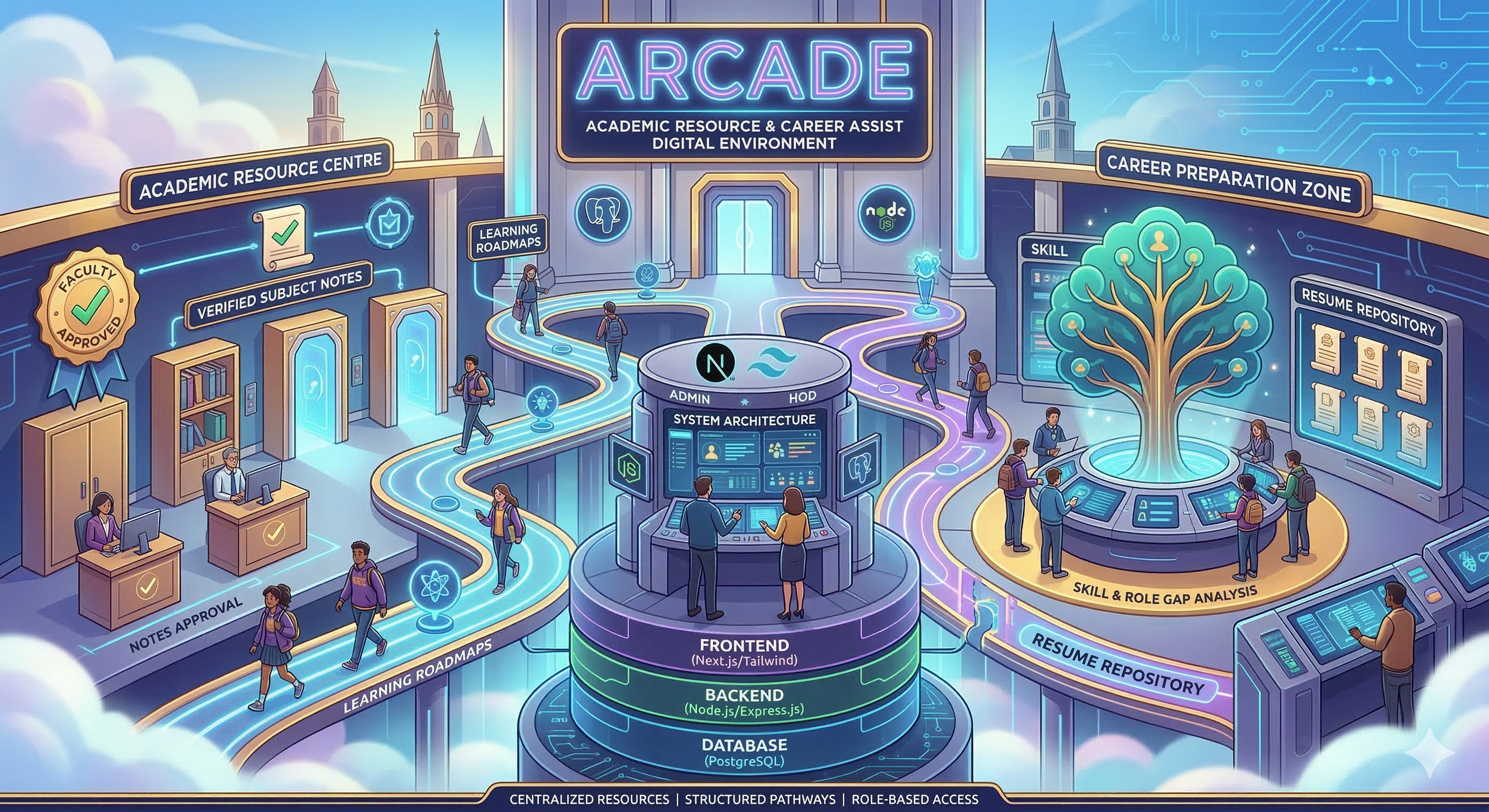
One schema, four ways to use the platform.
Every account is a student, faculty or admin in the database — HOD isn't a separate role, it's an is_hod flag on a faculty account that unlocks one extra queue. Permissions are enforced at the API layer, not just hidden in the UI.
Student
role: "student"The primary user. Browses the vault, follows a roadmap toward a target role, and runs the skill navigator.
- Download approved notes
- Upload notes for review
- Track roadmap progress
- Message expert network
Faculty
role: "faculty"Owns the verification queue for their subjects — every note a student uploads sits pending until a faculty member rules on it.
- Approve / reject notes
- Upload verified material
- View own teaching load
- Manage other users
HOD
faculty · is_hod: trueA faculty account with one extra unlock: the resume repository's final approval step, escalated above regular faculty review.
- Approve resume samples
- Everything a faculty can do
- Escalated content review
- Edit system-wide settings
Admin
role: "admin"Controls the access-control directory itself: verifying accounts, managing the resume archive, and watching system audit trails.
- Verify / suspend any user
- Manage external resources
- Read full audit log
- Override any approval
8 modules. Each one wired to a real route.
The README lists 7 core modules — this preview adds the Expert Network panel, a real (if undocumented) feature found in the codebase. Pick a module on the left: every panel lists the actual feature set and a live sample of how it behaves, built from the project's own models and API routes.
Authentication & Role Management
POST /api/auth/signup · /api/auth/loginCollege-email signup with bcrypt password hashing, NextAuth-backed sessions, and a role chosen at signup that the API enforces on every protected route.
- College email + college ID required at signup
- Password hashed with bcrypt before storage
- Faculty / admin signup gated behind an admin code
- Session-based role checks on every API route
Try it — switch roles to see what unlocks
Resource Vault
GET/POST /api/notes · /api/notes/pending · /api/notes/verifyStudents upload notes against a subject and semester; the file sits pending until the assigned faculty member approves or rejects it with a reason.
- Filter by semester, subject and free-text search
- Upload tags a specific faculty member for review
- Status moves pending → approved / rejected
- Tracks view_count and download_count per note
Faculty verification queue — act on a submission
Career Roadmaps
GET/POST /api/progressA node-based dependency graph replaces the static syllabus PDF. Students pick a target role, check off mandatory, advanced and optional nodes, and progress saves straight to StudentProgress.
- Mandatory, advanced and optional skill tiers
- Nodes lock until their prerequisites are checked
- Progress persists per student, per target role
- Confetti celebration on roadmap completion
Click a node to inspect it
Skill Navigator
Client-side scoring engineA 10-question binary-choice diagnostic — not a self-rating form. Each answer adds weighted points across five domains (systems, quantitative, operations, product, R&D), and the highest score picks the career-fit result.
- Forced binary choices remove rating-scale bias
- Scores 5 domains: SYS, QNT, OPS, PROD, RND
- Explains *why* the result fits the answers given
- Surfaces automation exposure and market demand
Take a 3-question sample
Expert Network
GET /api/alumniA directory of alumni and industry experts students can reach out to directly, tagged by the skills and domains they can speak to.
- Alumni vs. independent industry expert tagging
- Filter by skill tag (system design, ML, cloud…)
- Direct email and LinkedIn contact, no inbox lock-in
- Surfaced contextually from roadmap and skill results
Filter the network
Resume Archives
GET/POST /api/resumes · /api/admin/resumesA curated set of resume samples by domain and experience level. Every upload sits pending_hod until the department HOD approves or rejects it directly.
- Tagged by domain and experience level
- Uploads sit pending_hod until reviewed
- HOD approves or rejects with a reason
- Download count tracked per sample
Browse by experience level
Practice Zone
GET /api/subjectsCurated external links — official docs, practice judges, course notes — organized by subject so students aren't searching blind for which resource is worth their time.
- One curated set of links per subject
- Covers 8 semesters across the CS/IT curriculum
- Mix of practice judges, docs and course material
- Admin-managed, so links stay current
Pick a subject
Admin Control Panel
GET /api/user · POST /api/admin/approvalsOne directory for every account on the platform — verify new sign-ups, search by name or college ID, and read back the system's audit trail.
- Search and filter the full user directory
- Toggle account verification with one click
- Pending-verification count surfaced up front
- Append-only audit log of role and access changes
Access control directory
8 Mongoose schemas, not a mock API.
Every demo above maps to one of these collections. Cyan fields are ObjectId references — that's the actual relationship graph connecting roles, subjects, notes, resumes and progress.
User
Subject
FacultyTeachingLoad
Note
Notification
ResumeSample
StudentProgress
AuditLog
A standard, boring-on-purpose stack.
No exotic infra. One framework, one database, one auth library — the kind of stack that's easy for the next contributor to actually pick up.